
When adding NFC authentication to a product, a brand needs to consider more than the tag: who will provide and maintain the verification service, and where will customers see the result? If customers should also be able to read instructions, explore the product or contact support on the brand's website, the verification service needs to connect to that site.
BrandGuard provides online verification and an official widget that displays the result on your product page. Your team can continue to manage the existing website content while BrandGuard handles tag verification, without your brand having to build and operate its own NFC verification platform.
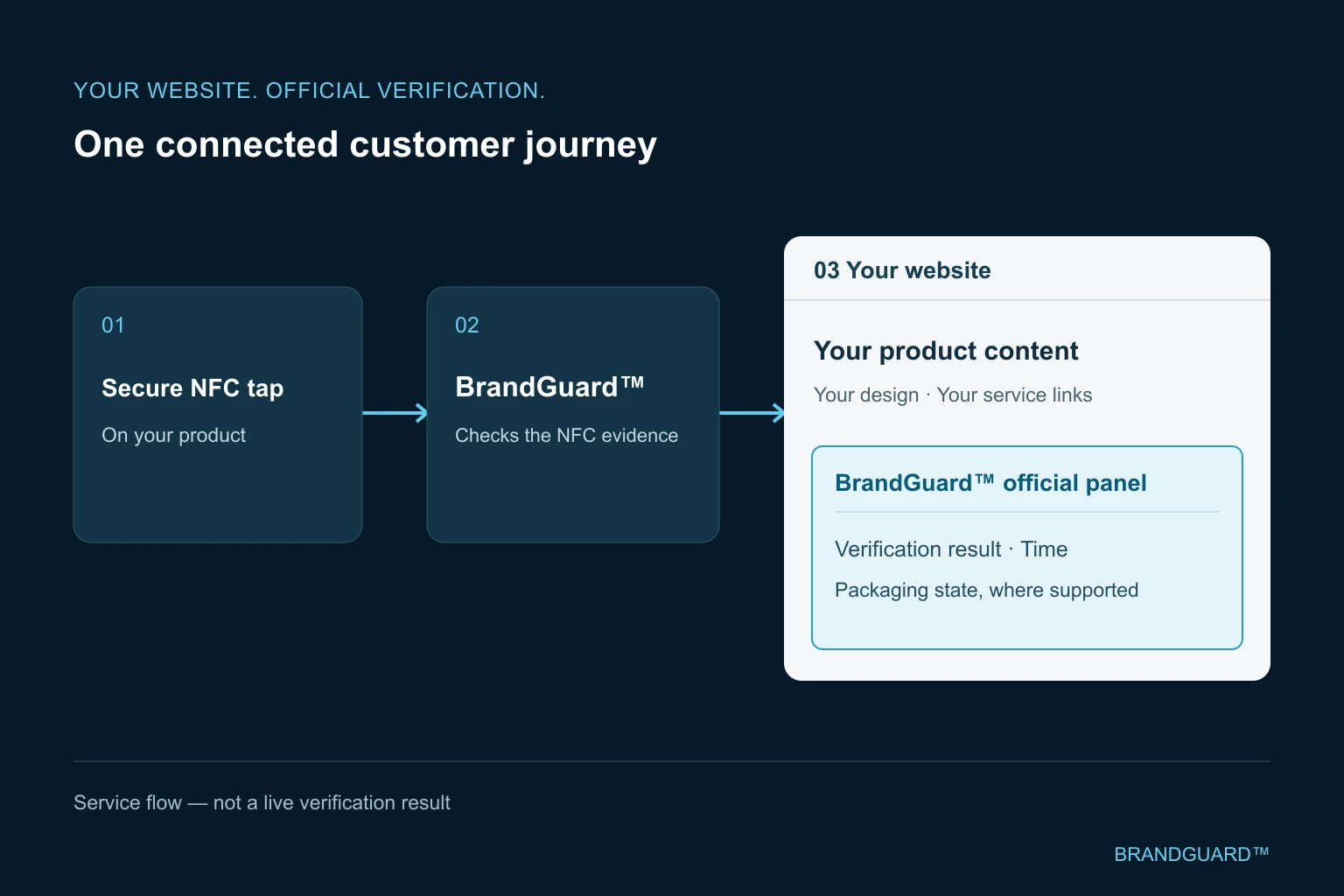
When a customer taps a secure NFC tag on your product, their browser first connects to BrandGuard's verification server. We check the information from that read. Once verification succeeds, the browser redirects to the product page you have chosen, where the official BrandGuard widget displays the result of that check.
From tapping the tag to viewing your product page
First, the phone reads the product's tag. The customer taps it with a compatible NFC phone and follows the phone's prompt to open the link. Information from that read is sent to BrandGuard's verification service. No dedicated app is needed.
Next, BrandGuard's server checks the cryptographic evidence from this tag read and the tag's link to the registered item, then makes the verification decision.
The browser then redirects to your product page. After a successful check, BrandGuard sends the customer to the destination URL configured for the project. The official verification widget on that page connects to BrandGuard's service and displays the result of the check just completed.
The customer now has your product page in front of them, with the verification result, product details and access to support.
How does your website receive and display the result?
ProofWidget is the official BrandGuard panel that displays verification results on a customer's website. It is also the component used by the WordPress verification plugin: the plugin adds and configures the component on the site, while the component retrieves and displays the verification just completed.
The component obtains that information from BrandGuard's result interface. This serves a different purpose from the Live Verification API: the component displays a check BrandGuard has already completed, whereas the Live Verification API lets your website backend request a check. This article describes the first flow.
Once connected, the panel can show the verification decision, time, available item information, applicable seal status and expiry messages. Your website team continues to maintain the surrounding product description, images, instructions and service links, so customers can check the result and find useful information on the same page.
The integration must be configured for the result to appear. An ordinary redirect opens the destination page; displaying the result of this verification on that page also requires the official component.
Connecting WordPress and other websites
WordPress sites can use BrandGuard's official verification plugin. Your website team installs it, completes the website integration settings and chooses where the panel appears. We have tested the full journey with real NFC tags and a phone on an actual WordPress website connected to BrandGuard's test environment, from reading and verification through redirection to result display.
For other platforms or custom-built websites, BrandGuard provides a general embedding method for a developer to add the component to a product page. This requires website registration and ownership verification, destination-page configuration, and testing on the actual site with real tags and phones.
Before a production launch, we confirm the service environment and integration settings with your team, then check tag reading, redirection and result display on the actual website.
What can customers check on the product page?
Customers can read the verification result, then compare the product details. BrandGuard maintains a separate record for each item. Depending on the result and the public product information configured, the panel can show an item identifier, product name, image or model details. Your team prepares detailed specifications, traceability information, instructions and support content on the product page.
With a tag that supports opening detection, tag authentication and seal status are shown separately. For example, after a customer opens the packaging, the tag may still authenticate while the seal is reported as opened. These findings tell the customer how the tag check turned out and whether an opening has been detected.
A successful verification result applies to the particular read that produced it. Visiting the product page directly, refreshing it or reopening an old link does not create a new valid verification. The page can still show product content, but the widget needs a corresponding valid result before it can show a successful check. To check the product again, the customer should tap its tag again. Our article on secure NFC verification beyond a URL explains this further. The absence of a valid result does not, by itself, establish that a product is counterfeit.
After checking the result, customers can continue to your instructions, care advice or collection information, or contact your support team. Putting that content beside the verification result gives them a practical way to find information from your brand through the product they own.
What do you need to prepare?
Start with an actual product, the product page customers should reach and the information you want to make public. Your website team chooses a position for the widget. BrandGuard works with them to confirm the integration configuration and the association between tags and product records, then tests the complete flow with real tags. Before launch, you can check which page opens, which verification result appears and whether the product information is correct.
If you also need the tags, BrandGuard's complete NFC protection service can cover tag production, secure encoding, online verification and website result display within the agreed scope. Formats such as secure NFC labels and tamper-detecting closure seals can be assessed for the product, with attachment and reading tested on the actual packaging.
If changing your website is not practical yet, you can use a BrandGuard-hosted verification page. This places the result on a different page from the website integration described above. The choice depends on your existing site and the content you want customers to see.
This article describes option C2: BrandGuard verifies the reading and, after success, the browser opens your product page. If the NFC link should reach your domain first, see the Live Verification API option (C3). Your backend requests verification and receives the response; your page then presents the result.
Questions about website verification integration
Does verification take place on BrandGuard's server or on my website?
In this service, BrandGuard's server verifies the information read from the tag. After successful verification, the browser redirects to the configured brand product page, where the official widget displays that result. Your website hosts the product content and widget; it does not need to run its own tag verification backend.
How do the official component, Live Verification API and Business System API differ?
The official component retrieves and displays a verification BrandGuard has just completed. The WordPress plugin adds that component to the website and does not require a Business System API token. The Live Verification API lets your website backend ask BrandGuard to verify the current tag read and receive the decision. The Business System API queries or synchronises product data and reads historical verification records. Those records cannot replace the check of the current read.
Can we build our own verification result display from scratch?
This article describes BrandGuard's official widget, whose position and surrounding product content you can arrange. For a display built by your website team, the Live Verification API offers another route: the NFC link reaches your domain first, your backend requests verification, and your page presents the returned decision and any available related information. Historical records from the business-system API do not replace this live check.
Which languages does the verification widget currently support?
English and Chinese are currently confirmed. Please discuss Japanese, Spanish or other language requirements when planning the project.
Can we use BrandGuard tags if we already have a verification platform?
Tag supply and secure encoding can be assessed against a system configuration agreed for your project. That differs from the service described here, in which BrandGuard provides online verification and results on your website. Requirements for an existing platform can be discussed separately.
Related service
This article describes the BrandGuard website verification component and its integration options. The flow has been tested with real tags on a WordPress website connected to the test environment. Other website integrations and production-launch requirements are confirmed for each project.